Disk Cleaner for Windows – Clean Up Disk Space Fast with AI

AiCleanDisk Pro is an AI-based Windows disk cleanup and folder management tool. It intelligently identifies folder purposes and provides clear instructions to help users safely clean or migrate large files and deep temporary files that occupy space, freeing up an average of 30GB+ of C drive space and quickly solving the problem of a full system disk.

Windows 10/11 · 32bit/64bit
Features

Best Disk Cleaner for Windows – Powerful Features

AiCleanDisk Pro offers AI-powered analysis, quick scanning, automatic cleaning, visual charts and many other powerful features, allowing you to easily monitor disk space usage and quickly free up storage.

01

AI Understands FoldersTells you what each folder actually is, whether you can delete it, and what happens if you do, so you're not guessing before you remove something from AppData or Program Files.

02

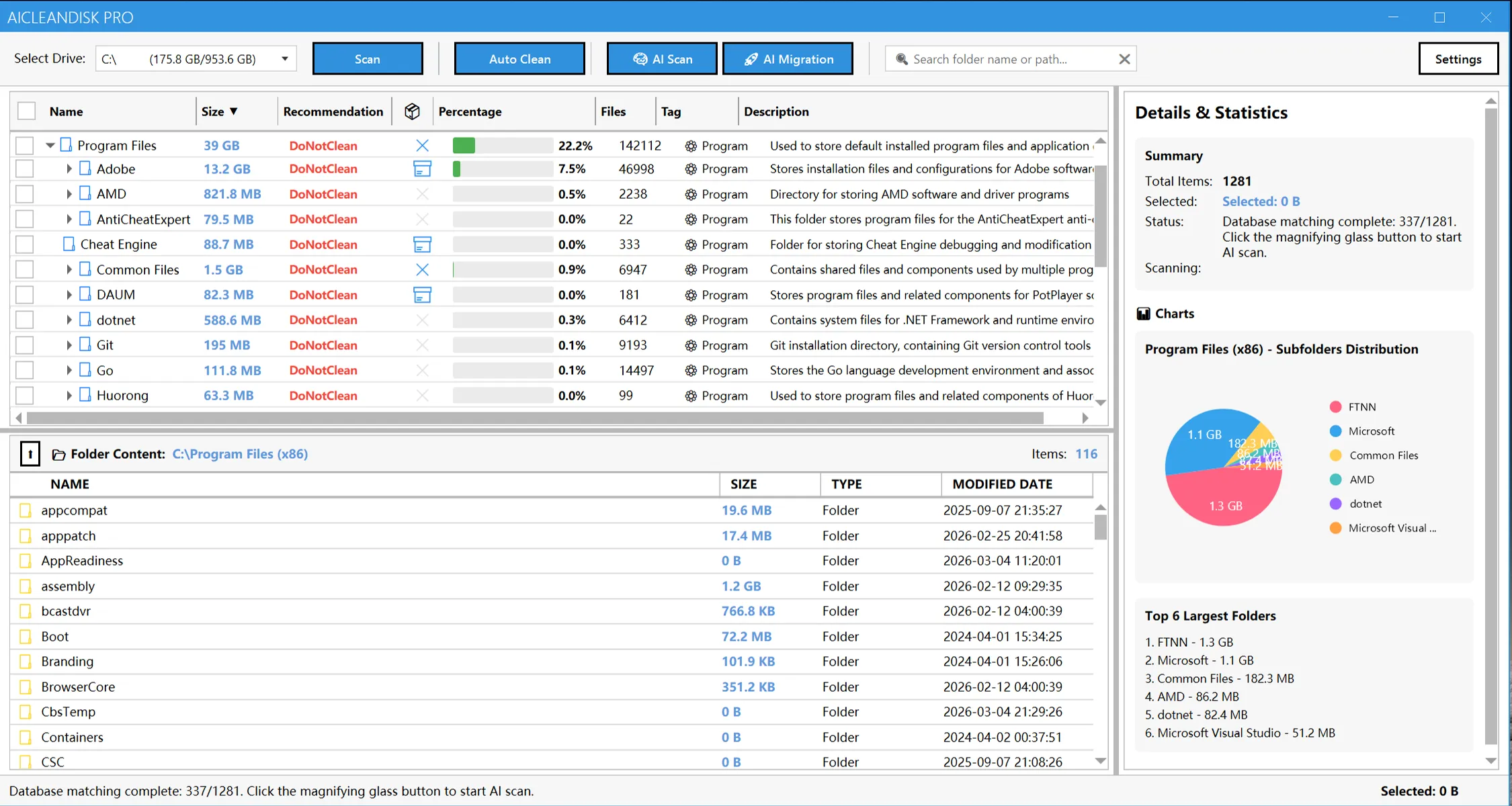
Quick Scan AnalysisScan the entire disk with one click to quickly find the folders and files that take up the most space, making it clear at a glance why the C drive is full!

03

One-Click Junk File CleaningAutomatically cleans cache, logs, system redundancy, and other files. The free version can also clean 10GB+ of space without manual screening.

04

Visual Data AnalysisIntuitively display the space occupation structure through charts to quickly locate the 'most space-consuming' positions.

05

Automatic Labeling of Migrated FoldersAI intelligently marks large folders that can be safely migrated, and transfers them to other disks with one click, which can greatly free up C drive space without deleting files.

06

Safe & ReliableComprehensive risk assessment mechanism ensures the safety of cleaning operations with preview scanning support.

AiCleanDisk Pro quickly cleared 30GB+ of junk with AI-powered analysis that identifies file purposes automatically—making Windows cleanup fast, smart, and effortless.
Guillermo Rauch avatarZhang MingSenior Development Engineer
Pricing

Pricing Plans for Everyone

From individual users to enterprise teams, we offer flexible pricing plans to meet different users' needs.

Free
$0
Average 6~10GB disk space freed.
Inject new vitality into your system, perfect for all users who want to quickly improve computer performance.
Included Features:
  • Fast disk scanning engine: Analyzes the system drive (C:) quickly, with intuitive charts to precisely locate large files and redundant directories.
  • Basic system cleanup: Safely remove system junk, temporary files, and logs to maintain basic system health.
  • Enhanced visualization & space potential assessment: Clear disk usage analysis and visual cleanup effects.
  • Professional software cache cleanup: Deep cache rules for professional stack residual files.
Pro EditionPopular
$4.99/month
Expected to clean 20~40GB or more space
Unlock the full potential of the AI engine, designed for users pursuing ultimate performance and maximum available space.
All Free features, plus:
  • AI-driven deep scanning & tagging: Exclusive AI engine intelligently identifies folder purposes, provides expert-level cleanup recommendations, and precisely locks onto 'cache dead zones' and 'upgrade residues' that traditional tools cannot find.
  • Deep junk file cleanup: AI scanning distinguishes independent junk files, upgrade residues, cache residues, and can identify junk files that most cleanup software cannot recognize.
  • AI lossless application migration: Intelligently identify and migrate large applications or files to other disks, ensuring program functionality remains intact while thoroughly relieving C drive pressure.
  • Migration insurance & one-click restore: Every migration is recorded on your PC and also noted on the drive that holds the moved data. Undo any move with one click at any time, and after reinstalling Windows or the app you can find those migrations on your other drives and reconnect them, as long as the moved data is still there.
  • Cloud rule library continuous updates: Our AI cleanup rules and software identification library are updated daily through the cloud, ensuring your cleanup effectiveness is always at its best.
Testimonials

What Our Users Say

Discover how users efficiently manage disk space with AiCleanDisk Pro, quickly free up storage, and improve system performance

My C drive was constantly full and I couldn't reinstall the system. After trying multiple disk cleanup tools without success, AiCleanDisk Pro not only cleaned about 20GB of junk files but also transferred 60GB of large folders through AI migration, successfully freeing up system disk space.
Annette Black avatar
Annette Black
Design Studio
As a developer, I frequently need to clean node_modules and cache directories. AiCleanDisk Pro can quickly scan and locate large folders, significantly improving file management and disk organization efficiency.
Dianne Russell avatar
Dianne Russell
Tech Company
Through visual charts, I can clearly see the disk space usage structure. The AI automatic marking of transferable folders feature allowed me to safely transfer over 100GB of data, freeing up C drive space without deleting files.
Cameron Williamson avatar
Cameron Williamson
Personal User
The software supports multiple cleanup types including system cache, log files, and temporary files. One-click cleanup combined with preview mechanism completes deep disk cleaning while ensuring data safety.
Robert Fox avatar
Robert Fox
Personal User
The free version already has powerful disk cleanup features. After upgrading to the professional version, you can unlock more advanced space analysis and optimization capabilities, significantly improving Windows system performance and stability.
Darlene Robertson avatar
Darlene Robertson
IT Administrator
AiCleanDisk Pro has a clean and intuitive interface. Even non-technical users can easily complete disk space cleanup, folder management, and system optimization operations.
Cody Fisher avatar
Cody Fisher
Regular User
AI intelligent analysis not only explains folder purposes but also provides safe cleanup recommendations. It frees up tens of GB of space without reinstalling the system, making it an efficient Windows disk management solution.
Albert Flores avatar
Albert Flores
Enterprise IT

Frequently Asked Questions

Learn how AiCleanDisk Pro helps you efficiently manage disk space and quickly free up storage

AiCleanDisk Pro is a professional Windows disk space management and cleaning tool that integrates AI-powered analysis, automatic cleaning, visual analytics, and many other powerful features. It can deeply clean system redundancy and hard-to-reach temporary files, averaging over 20GB or more of space freed on C drive. The developer personally experienced this problem and tried most cleaning software on the market without satisfactory results. This tool can clean most dead-end files while transferring C drive space, freeing you from space shortage troubles.
Common folders such as installed software, caches and temp folders are first matched against a folder database whose entries are reviewed by engineers, so you get a description and cleanup advice right away. Folders the database doesn't know are sent to the AI, which works out what they are for, whether they can be cleaned or moved to another drive, and what happens if you do. Only folder paths, names and sizes are sent, never file contents. The database is updated in the cloud, so new rules arrive without updating the app.
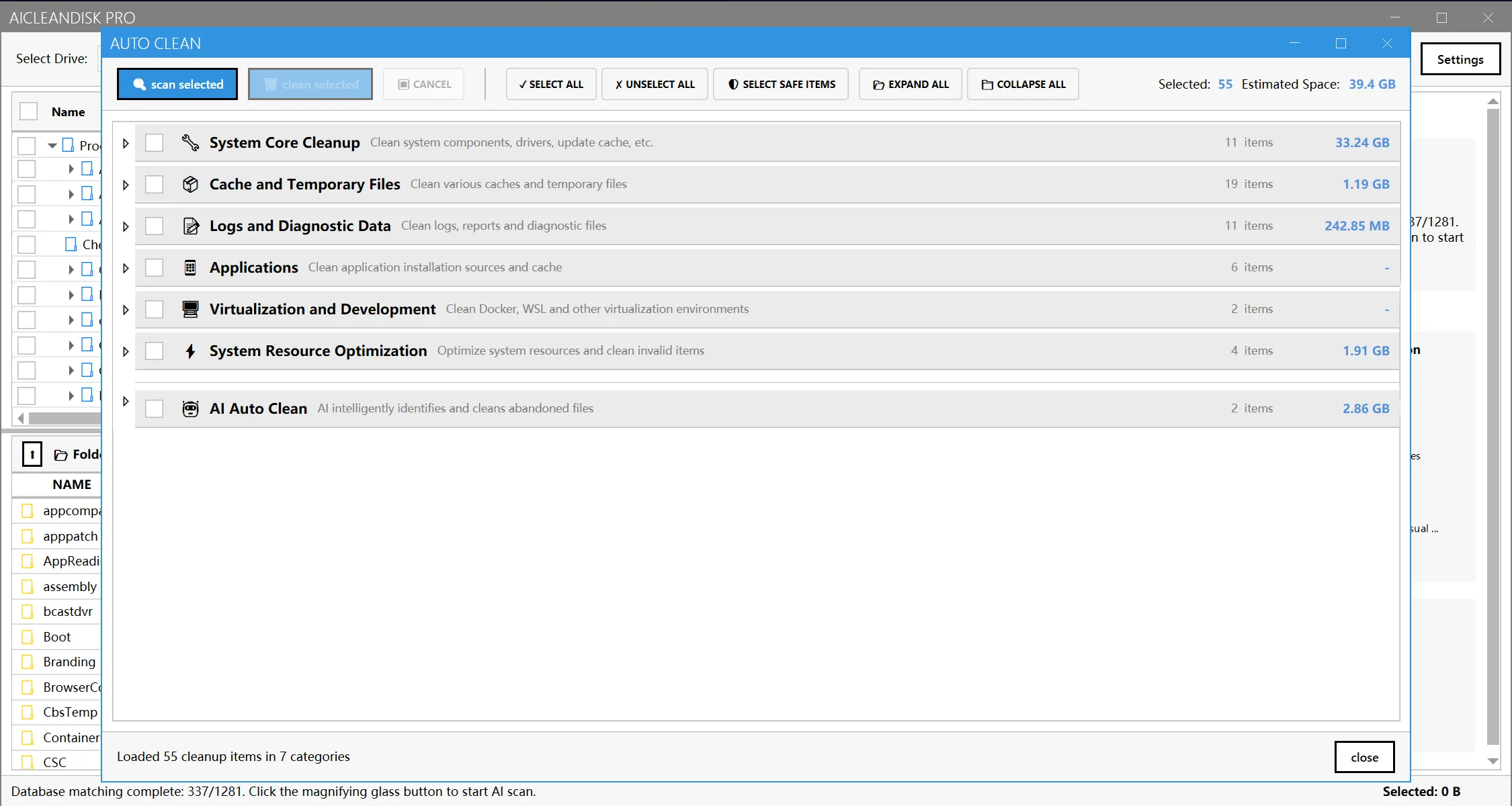
AiCleanDisk Pro has 8 cleanup categories: system core cleanup (Windows update files, Windows.old, system restore points, etc.), cache and temporary files, logs and diagnostic data, applications, virtualization and development (Docker, WSL, npm, pip and other caches), system resource optimization, game launchers (Steam, Epic, shader caches), and AI auto-clean (deprecated caches and upgrade leftovers identified by AI). Each item has a risk level from Safe to Critical, and you can scan and preview before cleaning.
The free version scans the system drive (C:) with charts, and runs auto clean and one-click smart clean on system junk, temporary files, logs and software caches. A Pro license adds scanning of other drives, AI folder analysis and AI auto-clean items, and moving large folders to another drive with one-click restore.
AI analysis is off until you agree to it, and you can turn it off anytime in Settings. When it is on, only folder paths, names and sizes are sent to our server to identify what each folder is. File contents are never read or uploaded. Folders already in the database or the local cache are not sent again. Scanning and cleaning run entirely on your PC.
Yes. Every cleanup item has a risk level from Safe to Critical, a confirmation dialog always appears before anything is cleaned, and high-risk items need an extra confirmation. You can scan and preview the file list first. Files go to the Recycle Bin by default so you can restore them; permanent deletion is an opt-in setting. Folder moves can be undone at any time.

Clean Up Disk Space on Windows in One Click

Download AiCleanDisk Pro now and experience AI-powered analysis, quick scanning, automatic cleaning, and many other powerful features to easily manage disk space and quickly free up storage.

View Pricing